> For the complete documentation index, see [llms.txt](https://docs.acpt.io/llms.txt). Markdown versions of documentation pages are available by appending `.md` to page URLs; this page is available as [Markdown](https://docs.acpt.io/integrations/wp-all-export.md).
# WP All Export
How to export ACPT meta fields and CCT table records with WP All Export
ACPT has a specific integration with [WP All Export](https://www.wpallexport.com/), letting you include meta fields — and, for **Custom Content Types**, table records — in any XML export you build for custom post types, taxonomies, or users.
The integration ships as a set of PHP functions you drop into a custom XML node in the WP All Export template. Each function returns a self-contained XML blob for one item (one post, one term, or one user), which the companion [WP All Import](/integrations/wp-all-import.md) integration knows how to read back in.
### Step 1. Create a custom post type
This topic was covered multiple times, so please refer to other tutorials.
Suppose we create a CPT called "Movie" with just three simple meta fields:
* **text**
* **email**
* **list**
Ok, let's move to step 2.
### Step 2. Export the meta fields
Go to WP All Export and select the Movie custom post type.
Now, select the XML custom format:
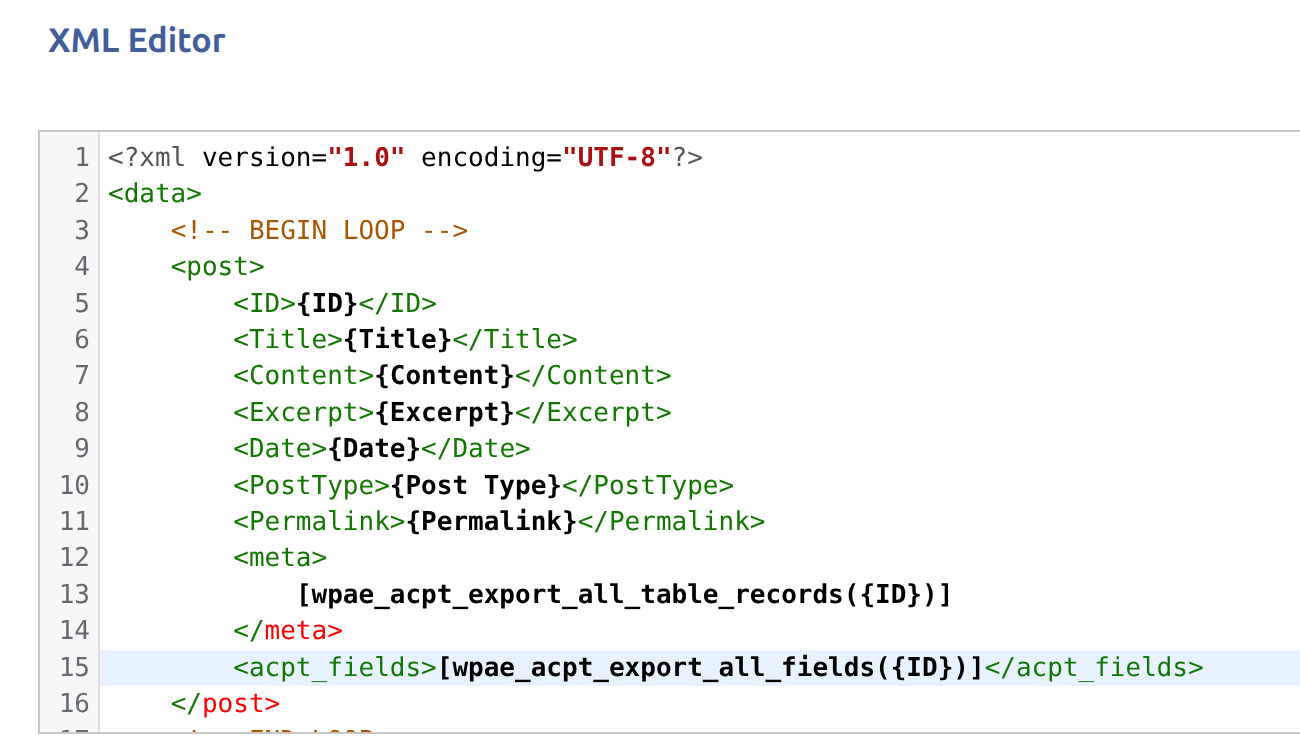
In the post loop, drag the standard fields you need (ID, title, etc...) and then create a custom XML node, the name of the node doesn't matter, and use this special PHP function:
```php
[wpae_acpt_export_all_fields({ID})]
```
This function takes just the post ID as an argument, and it exports the settings and the values of every Movie meta field associated with a given ID:
Go ahead and export the XML and you are good to go for import.
{% hint style="info" %}
If the Movie CPT has a regular CCT table attached to it (i.e. a table **not** using the "allow multiple records per host" setting), its column values are exported automatically as part of this same function — you don't need anything extra. Only tables using that setting need the dedicated functions below.
{% endhint %}
### Exporting Taxonomy or User meta fields
If you need to export taxonomy and user meta fields, the whole process is **identical**, except for the name of the PHP function to use:
```php
[wpae_acpt_export_all_tax_fields({Term_ID})]
```
```php
[wpae_acpt_export_all_user_fields({User_ID})]
```
Again, these functions take just one argument. Use these functions in your custom XML and export them everywhere you need.
## Exporting CCT table records
**Custom Content Types (CCT)** tables using the **"allow multiple records per host"** setting are managed as standalone records — each with its own numeric ID, visible in the table's Records list — rather than being folded automatically into the post's meta fields. Because of that, they are **not** included in `wpae_acpt_export_all_fields()` — export them with the dedicated functions instead:
```php
[wpae_acpt_export_all_table_records({ID})]
```
```php
[wpae_acpt_export_all_tax_table_records({Term_ID})]
```
```php
[wpae_acpt_export_all_user_table_records({User_ID})]
```
Each function takes the post/term/user ID, looks up every CCT table attached to that item through its table group's **location rules**, and — for the tables using that setting — serializes their record into one XML blob.
{% hint style="info" %}
A host (post, term, or user) can be linked to **at most one record per table** — the same way a post can't have two values under the same meta key. Attaching a second record to an already-linked host fails validation. If a table group has **multiple** record-based tables attached to the same host, each contributes its own `
` node with its own single record — that's where the "multiple" in these functions comes from.
{% endhint %}
{% hint style="info" %}
These functions require the **CCT** feature to be enabled and licensed (**ACPT → Settings → Content settings**). If CCT is not available, they return `null` and the custom XML node is simply left empty — safe to drop into an export template even if some sites don't have CCT active.
{% endhint %}
### Example
Suppose the Movie CPT has a table group whose location rules attach it to Movies, with two record-based tables: `review` (columns `author`, `rating`) and `specs` (columns `runtime_minutes`, `aspect_ratio`). Add this to a custom XML node:
```php
[wpae_acpt_export_all_table_records({ID})]
```
For a Movie linked to one record in each table, this produces:
```xml
Jane Doe5
1282.39:1
```
JSON-shaped columns (repeater/flexible content, foreign keys with multiple targets, etc.) are marked `type="json"` and contain a JSON-encoded value instead of a plain scalar.
Export the XML and move on to [WP All Import](/integrations/wp-all-import.md) to read it back in.